A habit-driven wellness app for healthy weight gain
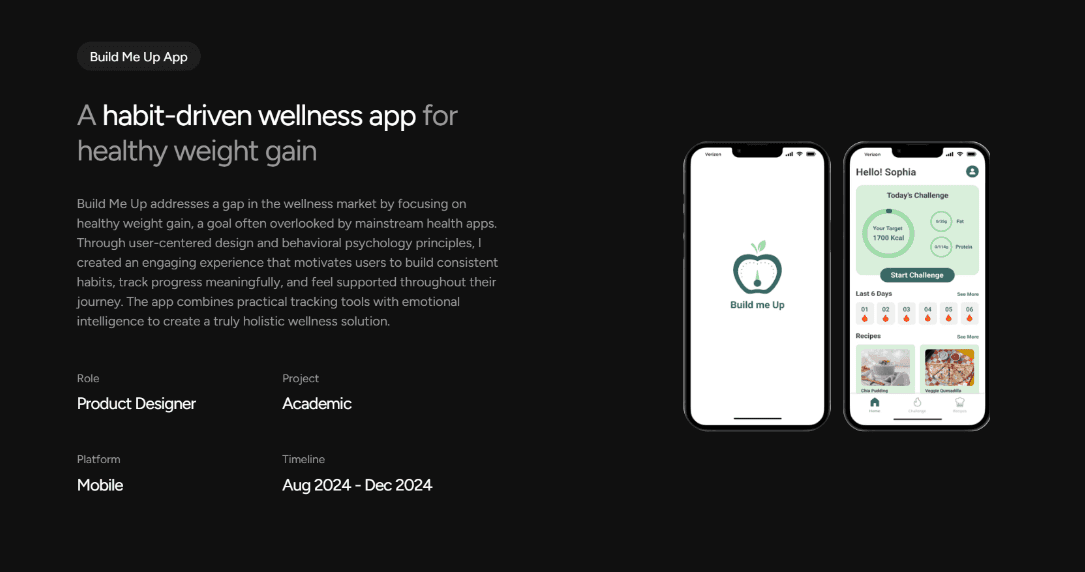
Build Me Up addresses a gap in the wellness market by focusing on healthy weight gain, a goal often overlooked by mainstream health apps. Through user-centered design and behavioral psychology principles, I created an engaging experience that motivates users to build consistent habits, track progress meaningfully, and feel supported throughout their journey. The app combines practical tracking tools with emotional intelligence to create a truly holistic wellness solution.
Build Me Up App
Role
Product Designer
Project
Academic
Platform
Mobile
Timeline
Aug 2024 -Dec 2024
Build Me Up App
A habit-driven wellness app for healthy weight gain
Build Me Up addresses a gap in the wellness market by focusing on healthy weight gain, a goal often overlooked by mainstream health apps. Through user-centered design and behavioral psychology principles, I created an engaging experience that motivates users to build consistent habits, track progress meaningfully, and feel supported throughout their journey. The app combines practical tracking tools with emotional intelligence to create a truly holistic wellness solution.
Role
Product Designer
Project
Academic
Platform
Mobile
Timeline
Aug 2024 - Dec 2024
Build Me Up App
A habit-driven wellness app for healthy weight gain
Build Me Up addresses a gap in the wellness market by focusing on healthy weight gain, a goal often overlooked by mainstream health apps. Through user-centered design and behavioral psychology principles, I created an engaging experience that motivates users to build consistent habits, track progress meaningfully, and feel supported throughout their journey. The app combines practical tracking tools with emotional intelligence to create a truly holistic wellness solution.
Role
Product Designer
Project
Academic
Platform
Mobile
Timeline
Aug 2024 - Dec 2024
Problem
Problem
Problem
Market Gap: Over 80% of health apps focus exclusively on weight loss, leaving users who want to gain weight without adequate support or resources.
Market Gap: Over 80% of health apps focus exclusively on weight loss, leaving users who want to gain weight without adequate support or resources.
User Pain: Approximately 1.6% of U.S. adults are underweight, with limited tools designed to help them gain weight in a healthy, sustainable way.
User Pain: Approximately 1.6% of U.S. adults are underweight, with limited tools designed to help them gain weight in a healthy, sustainable way.
Mental Health Impact: Underweight individuals often struggle with body image issues and anxiety, requiring an empathetic, motivating approach to behavior change.
Mental Health Impact: Underweight individuals often struggle with body image issues and anxiety, requiring an empathetic, motivating approach to behavior change.
Consistency Challenge: Building new habits around eating and exercise is difficult without proper motivation, tracking, and accountability systems.
Consistency Challenge: Building new habits around eating and exercise is difficult without proper motivation, tracking, and accountability systems.
Solution
Solution
Build Me Up combines practical tracking with emotional design to create a supportive, habit-forming experience.
Build Me Up combines practical tracking with emotional design to create a supportive, habit-forming experience.
Daily Calorie Challenges
Helping users build consistency through achievable daily goals
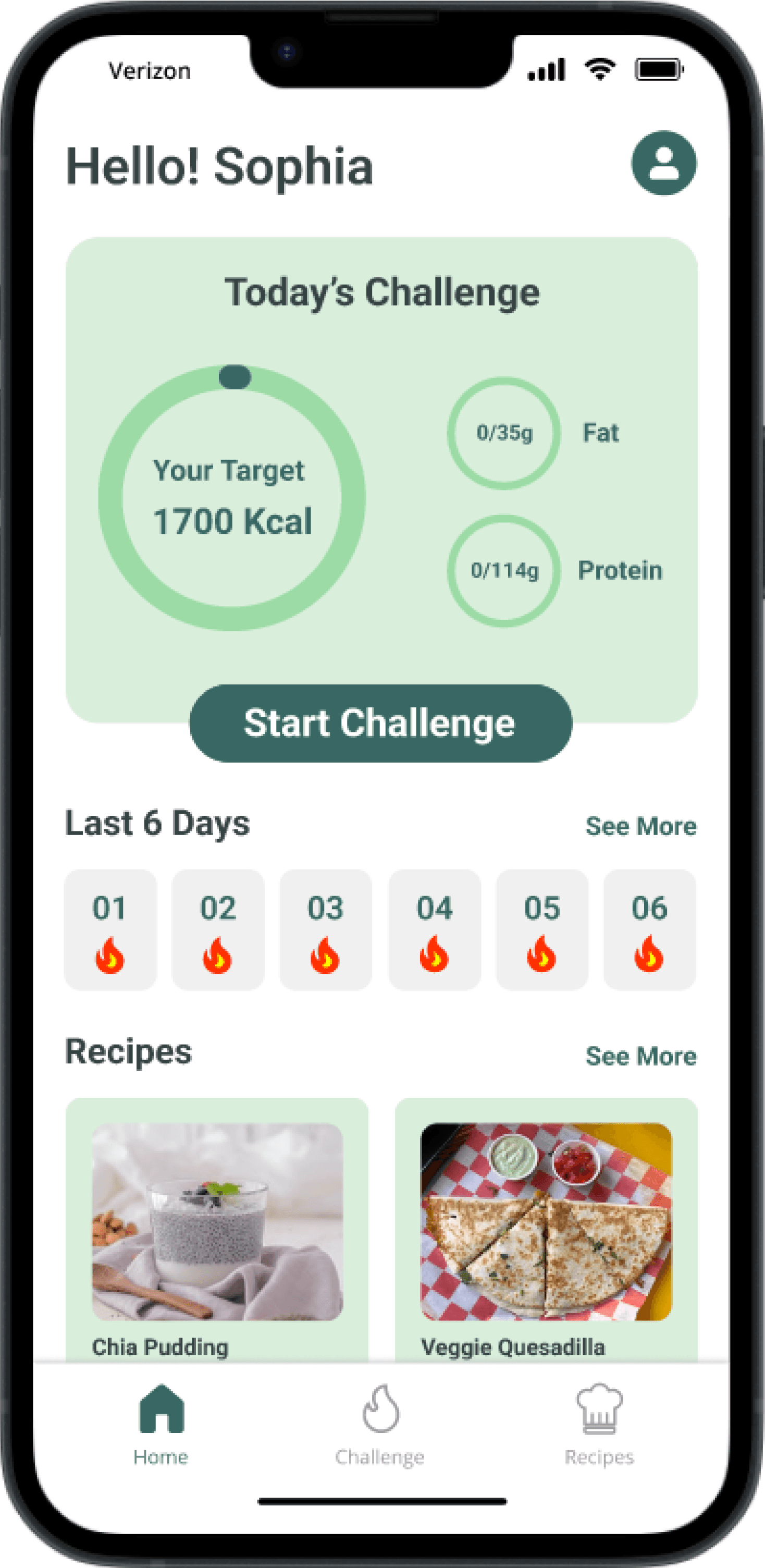
Users receive a clear daily calorie intake challenge tailored to their weight-gain goal. Instead of overwhelming users with long-term targets, the app focuses on small, achievable actions that encourage consistency and reduce drop-off.
Streaks & Progress Tracking
Reinforcing habits through visual progress
Streaks visually represent a user’s consistency over time, helping them stay motivated even when physical results take longer to appear. Progress is framed around effort and habit, not just outcomes.
Freeze Reward
Allowing flexibility without breaking momentum
After maintaining a streak for a set number of days, users unlock a Freeze Day. This allows them to pause for a day without losing their streak, reducing guilt and preventing users from abandoning the app after a missed day.
Personalized Recipes
Reducing decision fatigue with tailored meal guidance
The app provides healthy, weight-gain focused recipes that users can save for later. This reduces the mental effort of meal planning while supporting healthier eating habits aligned with their goals.
Daily Calorie Challenges
Helping users build consistency through achievable daily goals
Helping users build consistency through achievable daily goals
Users receive a clear daily calorie intake challenge tailored to their weight-gain goal. Instead of overwhelming users with long-term targets, the app focuses on small, achievable actions that encourage consistency and reduce drop-off.
Users receive a clear daily calorie intake challenge tailored to their weight-gain goal. Instead of overwhelming users with long-term targets, the app focuses on small, achievable actions that encourage consistency and reduce drop-off.
Streaks & Progress Tracking
Reinforcing habits through visual progress
Streaks visually represent a user’s consistency over time, helping them stay motivated even when physical results take longer to appear. Progress is framed around effort and habit, not just outcomes.
Freeze Reward
Allowing flexibility without breaking momentum
After maintaining a streak for a set number of days, users unlock a Freeze Day. This allows them to pause for a day without losing their streak, reducing guilt and preventing users from abandoning the app after a missed day.
Personalized Recipes
Reducing decision fatigue with tailored meal guidance
The app provides healthy, weight-gain focused recipes that users can save for later. This reduces the mental effort of meal planning while supporting healthier eating habits aligned with their goals.
Streaks & Progress Tracking
Reinforcing habits through visual progress
Streaks visually represent a user’s consistency over time, helping them stay motivated even when physical results take longer to appear. Progress is framed around effort and habit, not just outcomes.
Freeze Reward
Allowing flexibility without breaking momentum
After maintaining a streak for a set number of days, users unlock a Freeze Day. This allows them to pause for a day without losing their streak, reducing guilt and preventing users from abandoning the app after a missed day.
Personalized Recipes
Reducing decision fatigue with tailored meal guidance
The app provides healthy, weight-gain focused recipes that users can save for later. This reduces the mental effort of meal planning while supporting healthier eating habits aligned with their goals.
30%
Increase in user motivation
Based on usability testing feedback
85%
Task completion rate
Users successfully completed key workflows
4.7/5
Average user satisfaction
Across all tested features
Impact & Result
Build Me Up combines practical tracking with emotional design to create a supportive, habit-forming experience.
Impact & Result
Impact & Result
Build Me Up combines practical tracking with emotional design to create a supportive, habit-forming experience.
Build Me Up combines practical tracking with emotional design to create a supportive, habit-forming experience.
30%
Increase in user motivation
Based on usability testing feedback
85%
Task completion rate
Users successfully completed key workflows
4.7/5
Average user satisfaction
Across all tested features
Design Process
Design Process
I followed the Five Planes of UX Design framework from The Elements of User Experience by Jesse James Garrett, layered with principles from habit-forming design (inspired by the Hooked Model). The process moved from abstract strategy to detailed surface design:
I followed the Five Planes of UX Design framework from The Elements of User Experience by Jesse James Garrett, layered with principles from habit-forming design (inspired by the Hooked Model). The process moved from abstract strategy to detailed surface design:
Strategy
Ideation
Storyboarding
Scope
Kano Card
MoSCoW
Structure
User Flow
Skeleton
Mood Board
Style Guide
Low Fidelity
Surface
Hi-Fidelity Designs
Usability Testing
Strategy
Ideation
Storyboarding
Scope
Kano Card
MoSCoW
Structure
User Flow
Skeleton
Mood Board
Style Guide
Low Fidelity
Surface
Hi-Fidelity Designs
Usability Testing
Ideation
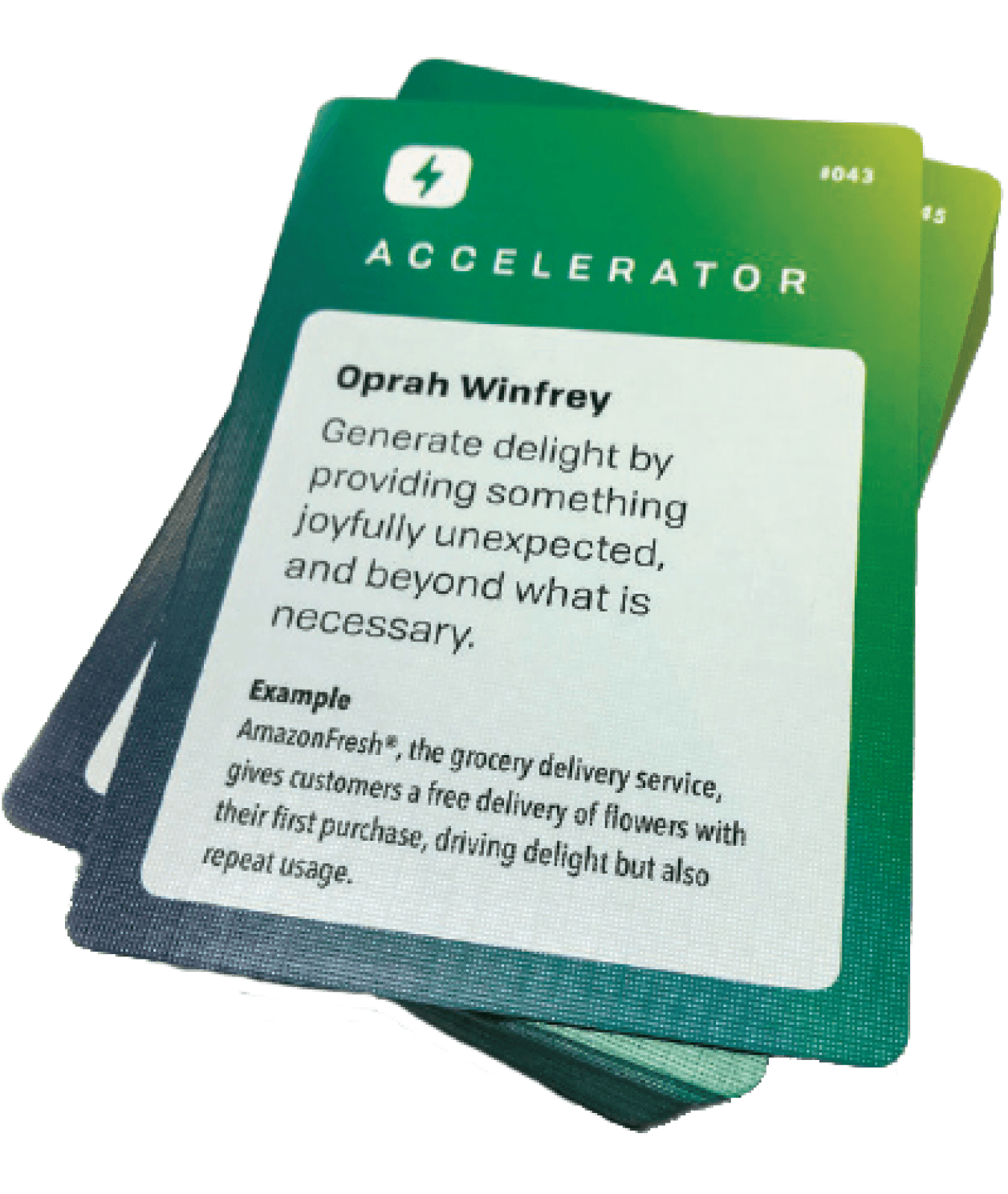
To explore creative approaches beyond traditional tracking features, I used the Accelerators in Health Care ideation framework from Penn Medicine. This card-based method helped expand the solution space and think through behavior-driven interventions.
What I explored
Motivational triggers
Habit reinforcement
Emotional support beyond metrics
Key Insight
Users are more likely to stay consistent when progress feels achievable, flexible, and emotionally reassuring.
Storyboard
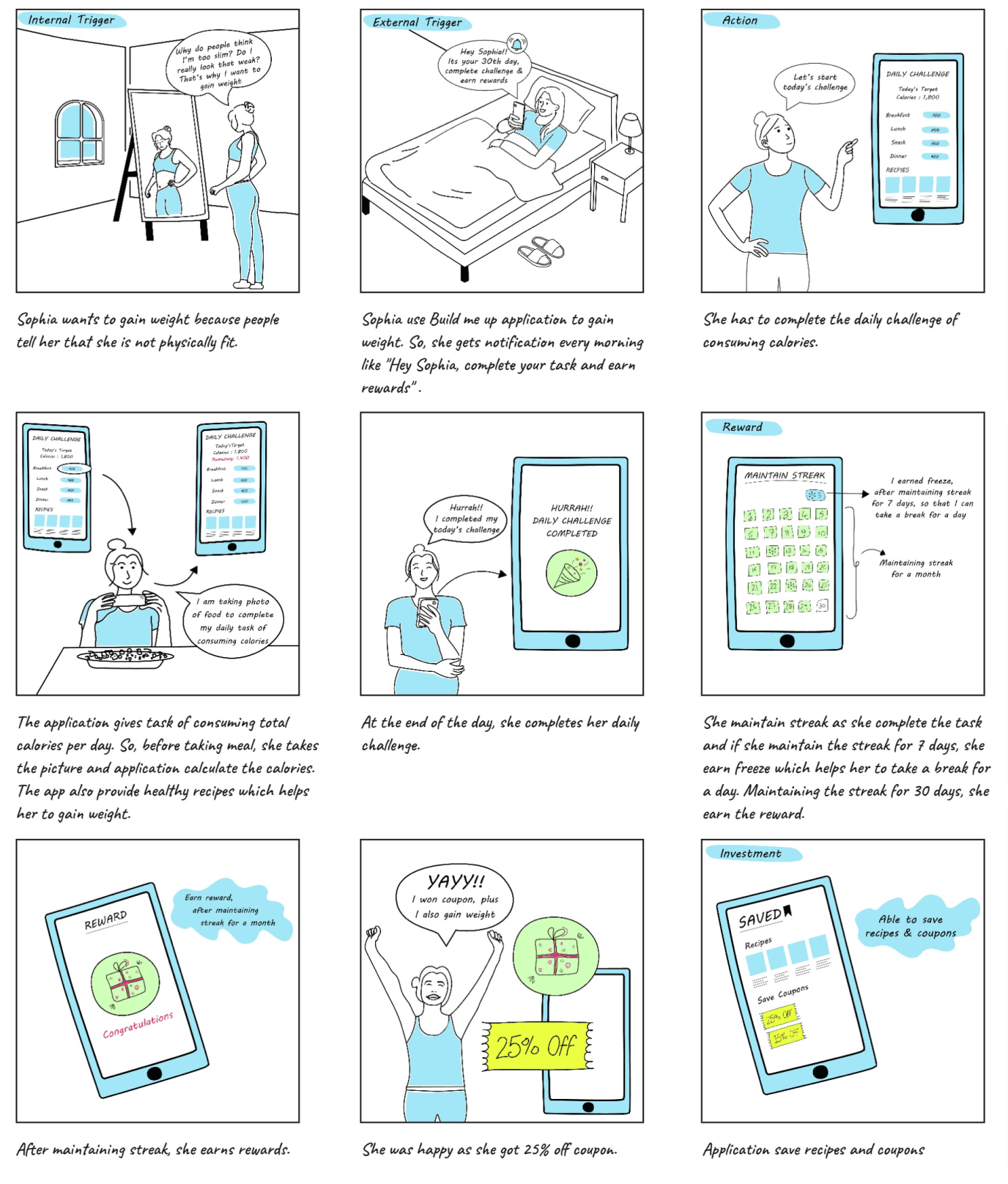
To translate insights into a clear user journey, I mapped the experience using the
Trigger → Action → Reward → Investment framework.
Trigger: Notifications prompt users to open the app
Action: Users complete a daily calorie challenge
Reward: Visual progress and streak reinforcement
Investment: Saved recipes and rewards encourage return usage
Why this mattered
Framing progress around effort—not perfection—helped reduce drop-off and encouraged habit formation.
Feature Prioritization with the Kano Card
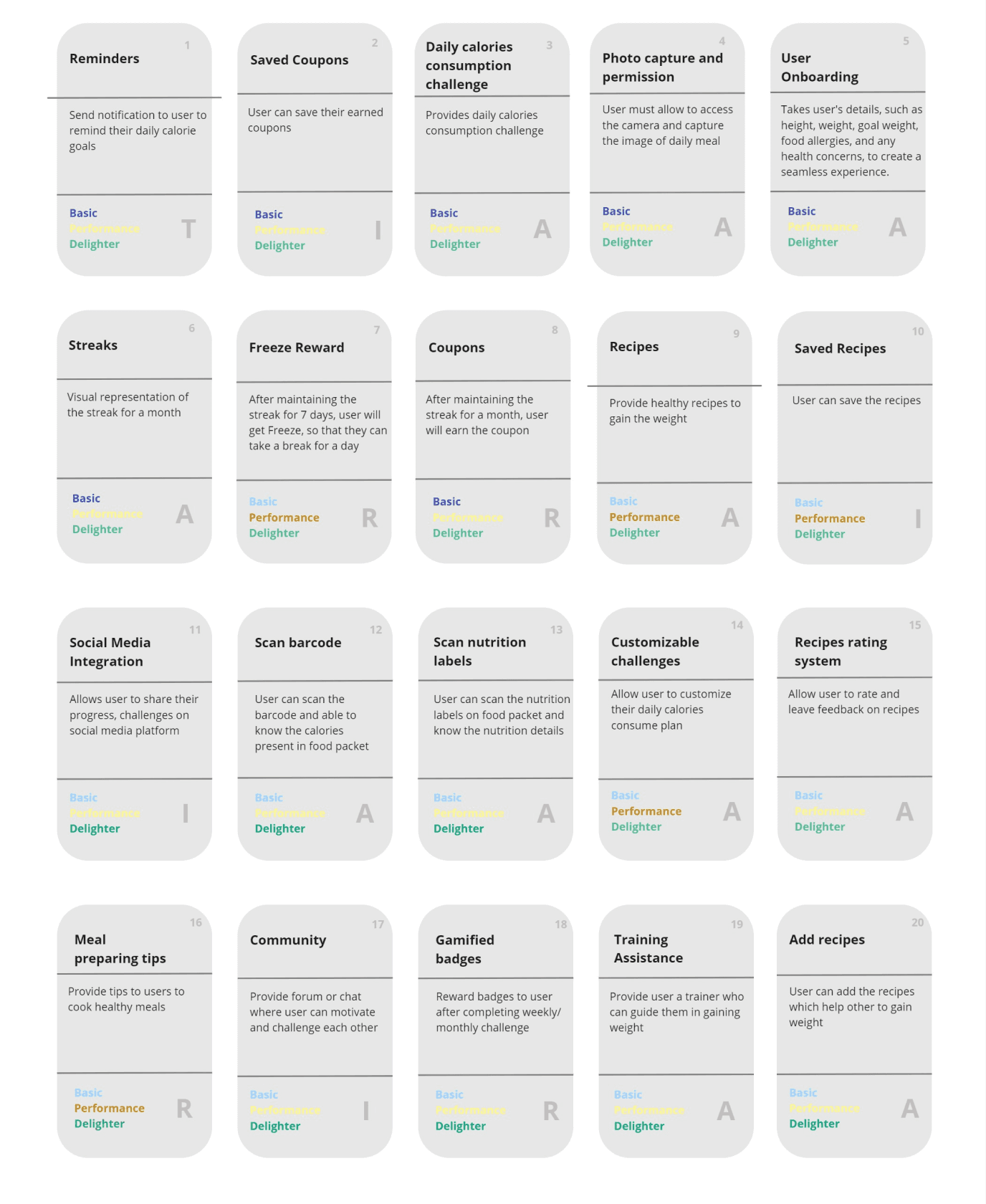
To ensure Build Me Up delivered meaningful value without overloading users, I used the Kano Model to evaluate features based on their impact on user satisfaction.
How I categorized features
Basic needs: Daily calorie challenges, goal setting, features users expect by default
Performance features: Streak tracking, personalized recipes, directly improved satisfaction
Delighters: Rewards and Freeze Days, created moments of motivation and surprise
Key Decision
I prioritized performance and delight features that reinforce motivation and habit formation, rather than adding more tracking complexity.
Organizing Development with MoSCoW Prioritization
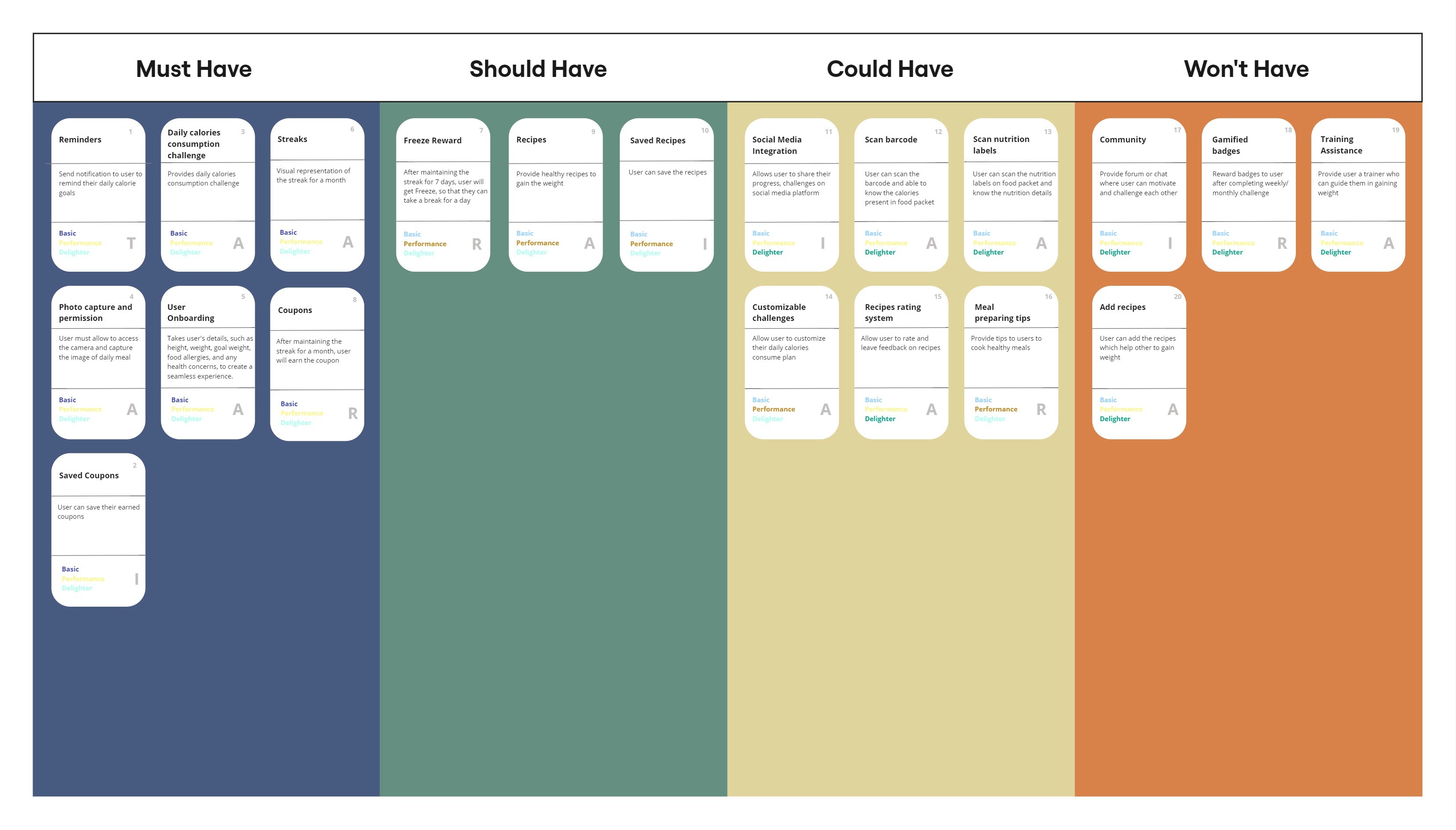
After defining feature value, I used the MoSCoW method to translate insights into a clear and achievable MVP roadmap.
MVP focus
Must-haves: Onboarding, daily challenges, notifications
Should-haves: Recipes, Freeze Days
Could-haves: Social sharing, barcode scanning
Won’t-haves (for now): Advanced integrations deferred for future phases
Key Outcome
This prioritization helped keep the MVP focused on habit-building features while managing scope and development effort.
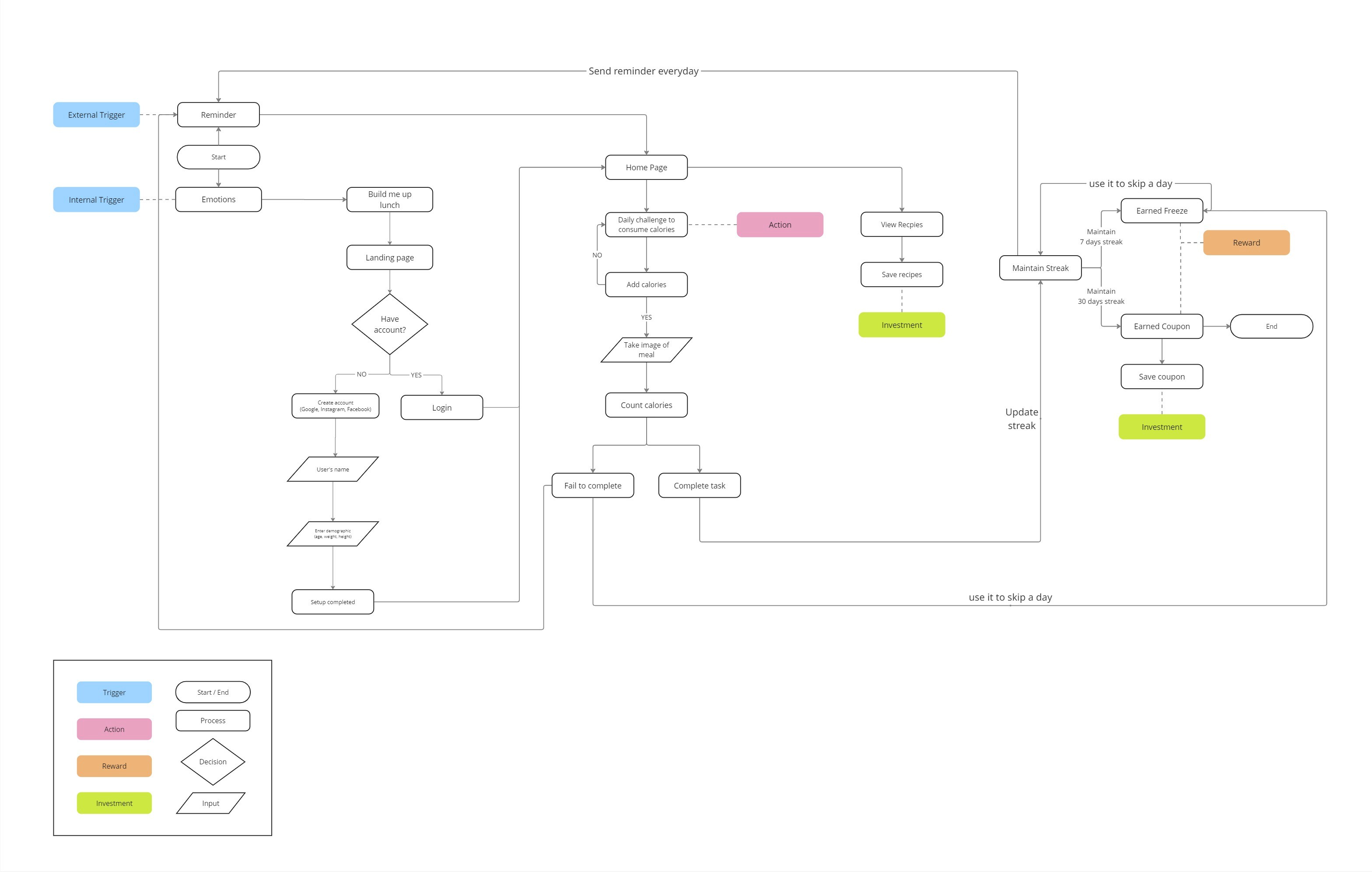
User Flow
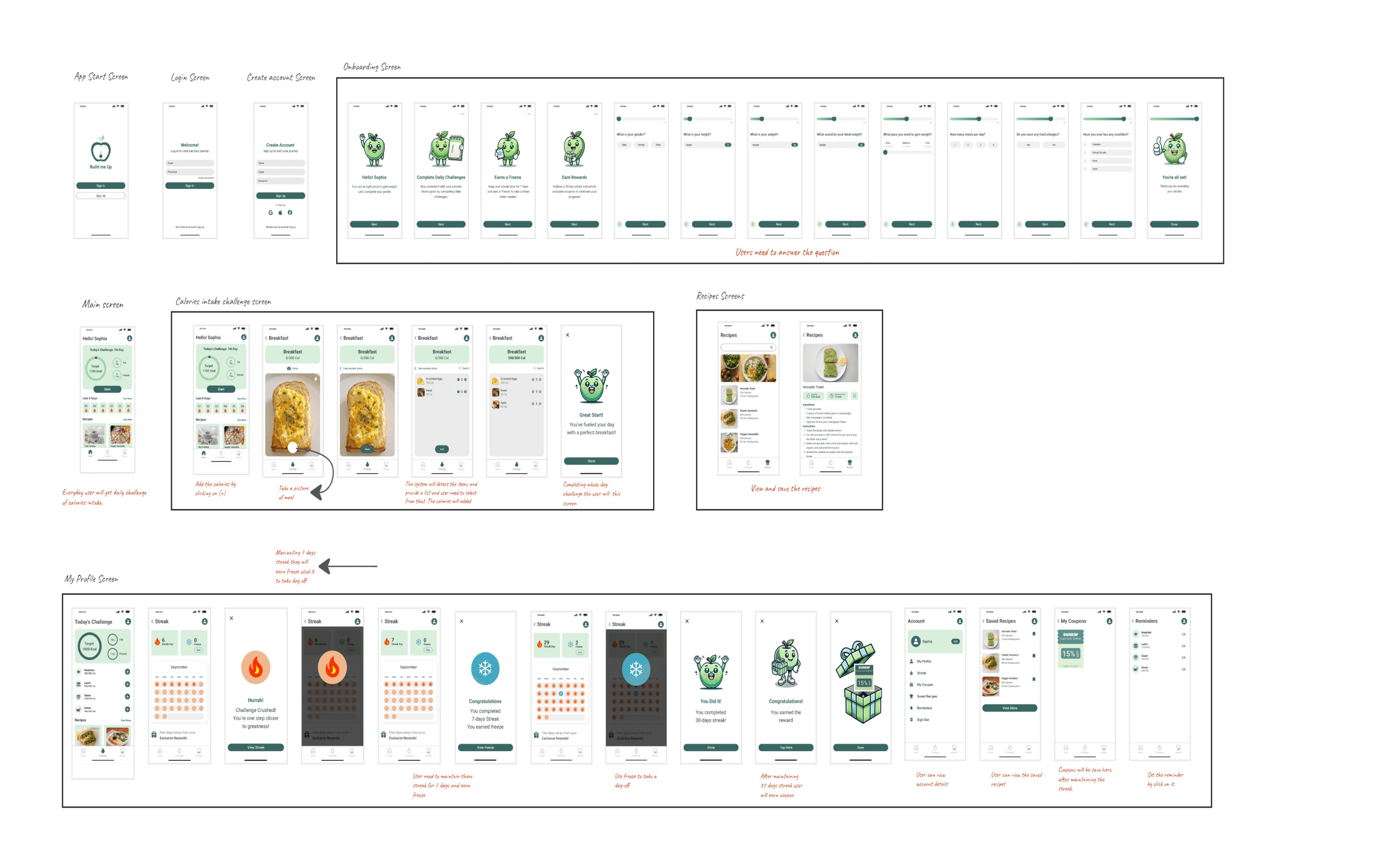
To ensure users could move through Build Me Up with clarity and minimal friction, I designed a detailed user flow that mapped the full journey from onboarding to daily engagement.
How the flow was structured
Onboarding to capture goals and personalize calorie targets
A clear daily entry point focused on completing the calorie challenge
Simple paths to maintain streaks and access recipes without distraction
Key Decision
I centered the flow around a single daily action, so users always know what to do next without feeling overwhelmed.
Ideation
To explore creative approaches beyond traditional tracking features, I used the Accelerators in Health Care ideation framework from Penn Medicine. This card-based method helped expand the solution space and think through behavior-driven interventions.
What I explored
Motivational triggers
Habit reinforcement
Emotional support beyond metrics
Key Insight
Users are more likely to stay consistent when progress feels achievable, flexible, and emotionally reassuring.
Storyboard
To translate insights into a clear user journey, I mapped the experience using the
Trigger → Action → Reward → Investment framework.
Trigger: Notifications prompt users to open the app
Action: Users complete a daily calorie challenge
Reward: Visual progress and streak reinforcement
Investment: Saved recipes and rewards encourage return usage
Why this mattered
Framing progress around effort—not perfection—helped reduce drop-off and encouraged habit formation.
Feature Prioritization with the Kano Card
To ensure Build Me Up delivered meaningful value without overloading users, I used the Kano Model to evaluate features based on their impact on user satisfaction.
How I categorized features
Basic needs: Daily calorie challenges, goal setting, features users expect by default
Performance features: Streak tracking, personalized recipes, directly improved satisfaction
Delighters: Rewards and Freeze Days, created moments of motivation and surprise
Key Decision
I prioritized performance and delight features that reinforce motivation and habit formation, rather than adding more tracking complexity.
Organizing Development with MoSCoW Prioritization
After defining feature value, I used the MoSCoW method to translate insights into a clear and achievable MVP roadmap.
MVP focus
Must-haves: Onboarding, daily challenges, notifications
Should-haves: Recipes, Freeze Days
Could-haves: Social sharing, barcode scanning
Won’t-haves (for now): Advanced integrations deferred for future phases
Key Outcome
This prioritization helped keep the MVP focused on habit-building features while managing scope and development effort.
User Flow
To ensure users could move through Build Me Up with clarity and minimal friction, I designed a detailed user flow that mapped the full journey from onboarding to daily engagement.
How the flow was structured
Onboarding to capture goals and personalize calorie targets
A clear daily entry point focused on completing the calorie challenge
Simple paths to maintain streaks and access recipes without distraction
Key Decision
I centered the flow around a single daily action, so users always know what to do next without feeling overwhelmed.
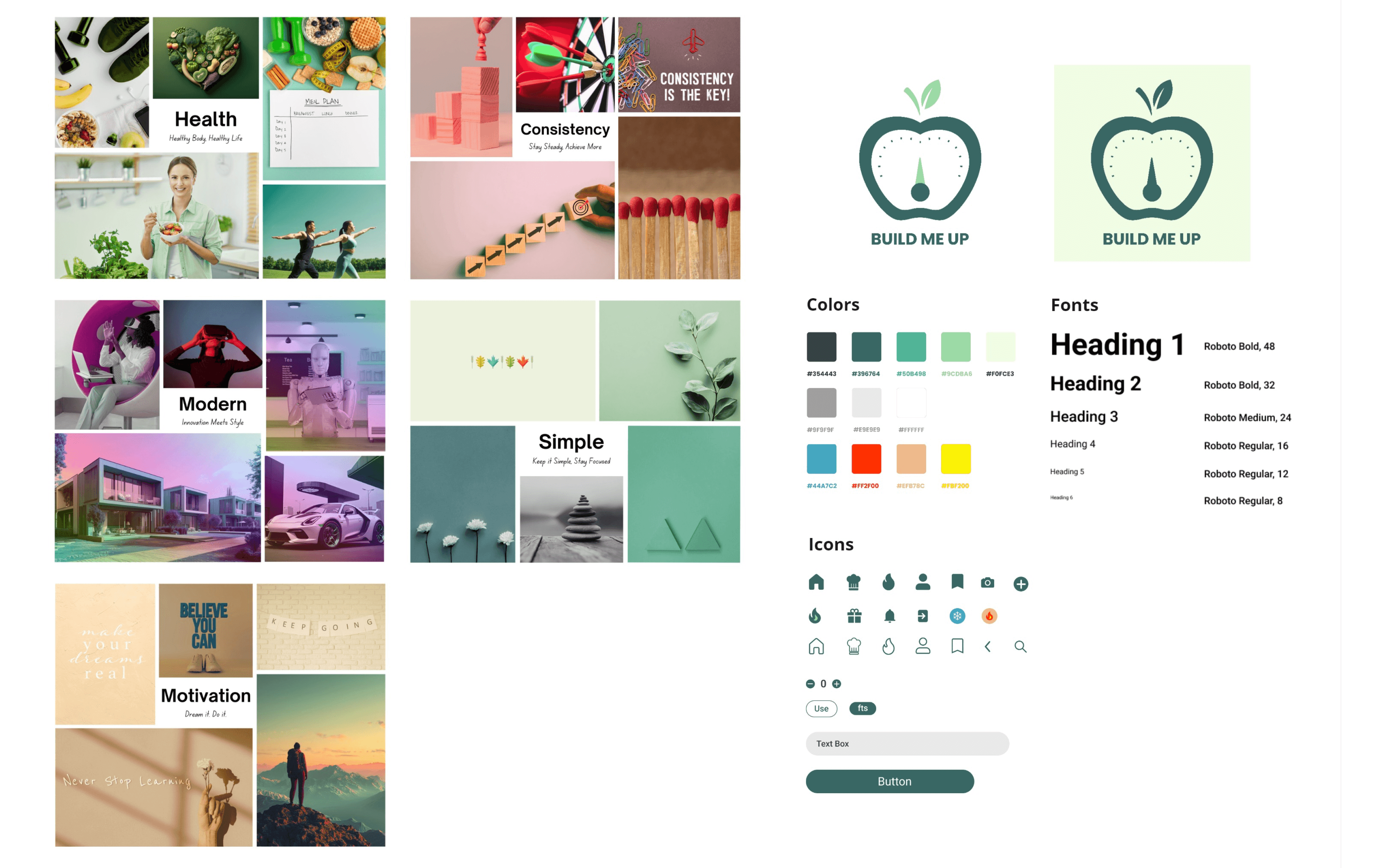
Mood Board and Study Guide
To create a visual experience that feels supportive rather than judgmental, I developed a mood board and style guide aligned with the emotional goals of the product.
How the visual direction was defined
Focused on themes of health, consistency, and motivation
Used natural, earthy tones to evoke comfort and approachability
Selected clean, legible typography to support accessibility
Key Decision
I intentionally avoided aggressive fitness aesthetics and designed a calm, encouraging visual system that reinforces progress over perfection.
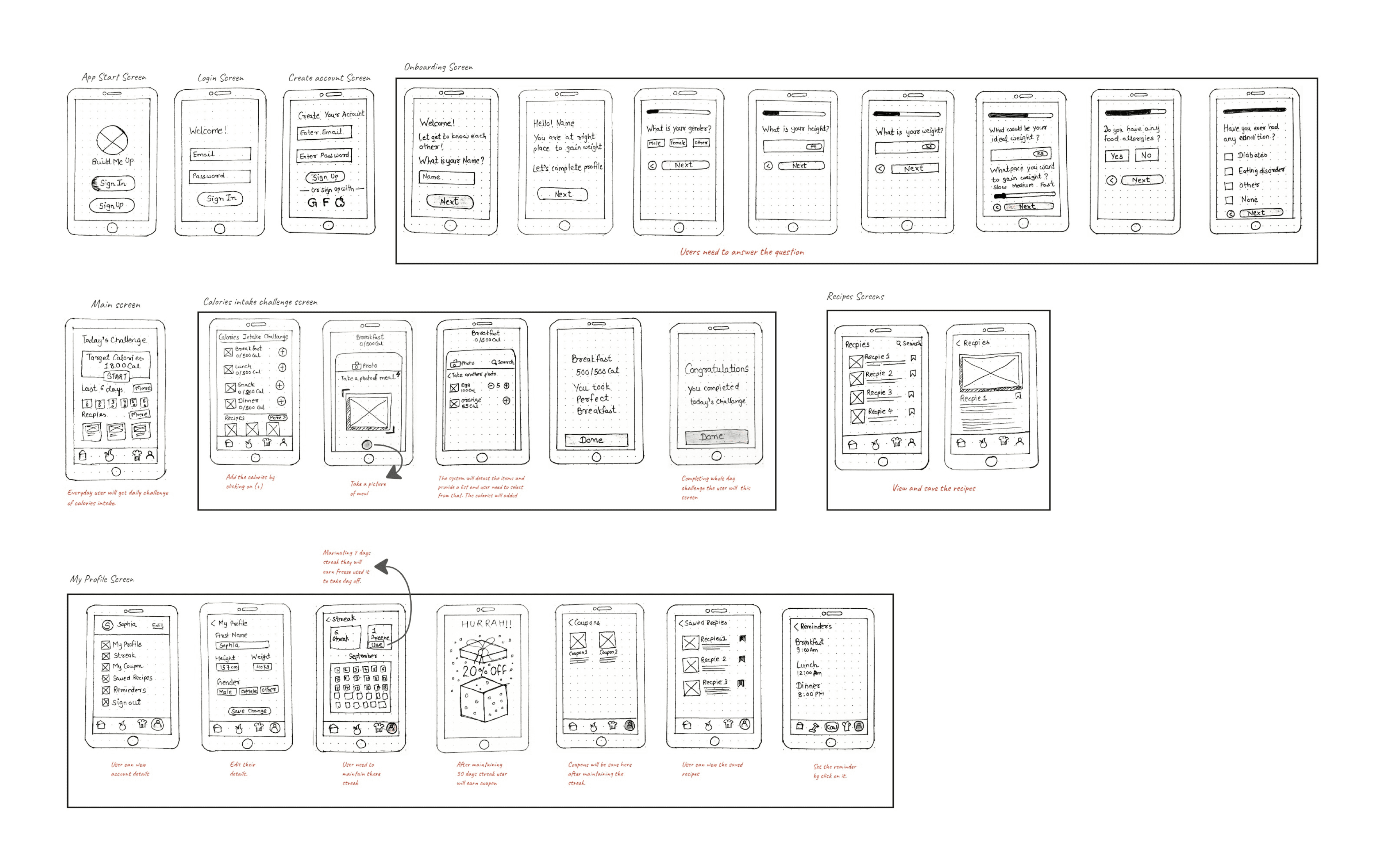
Low Fidelity
To validate the core structure and interactions early, I created low-fidelity wireframes focused on layout, flow, and usability—without visual distraction.
How I approached it
Sketched core screens for onboarding, daily challenges, streaks, and recipes
Focused on content hierarchy and primary actions
Tested flows quickly to identify friction points
Key Decision
I intentionally kept wireframes minimal to prioritize interaction clarity over visual polish.
To validate the core structure and interactions early, I created low-fidelity wireframes focused on layout, flow, and usability, without visual distraction.
How I approached it
Sketched core screens for onboarding, daily challenges, streaks, and recipes
Focused on content hierarchy and primary actions
Tested flows quickly to identify friction points
Key Decision
I intentionally kept wireframes minimal to prioritize interaction clarity over visual polish.
High Fidelity
High Fidelity
Once the structure and flows were validated, I translated the wireframes into high-fidelity designs aligned with the visual system and emotional goals of the product.
How the designs evolved
Applied the style guide to ensure consistency and accessibility
Refined visual hierarchy, spacing, and interaction states
Designed key screens for daily challenges, progress tracking, and rewards
Key Decision
I focused on creating a calm, encouraging interface that reinforces progress without adding pressure.
Once the structure and flows were validated, I translated the wireframes into high-fidelity designs aligned with the visual system and emotional goals of the product.
How the designs evolved
Applied the style guide to ensure consistency and accessibility
Refined visual hierarchy, spacing, and interaction states
Designed key screens for daily challenges, progress tracking, and rewards
Key Decision
I focused on creating a calm, encouraging interface that reinforces progress without adding pressure.